2018年7月17日 星期二

TP-Link Archer MR400 AC1350 Router Review

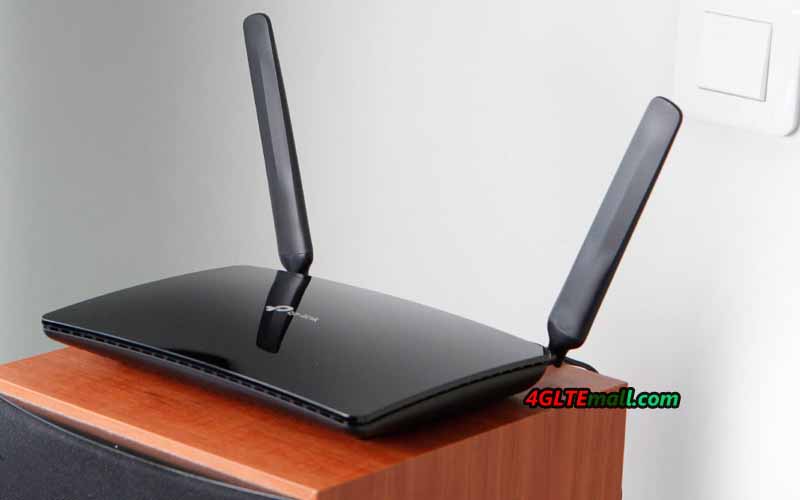
TP-link Archer MR400 is a powerful 3G/4G router from TP-Link, designed for users who need high data transfer speed in a WiFi network. This model combines support for most popular 3G and LTE mobile Internet standards with a high-speed dual-band WiFi module that supports the 802.11ac protocol.   The line of TP-Link Archer wireless routers has won great popularity among users due to the low price and excellent technical characteristics. The Archer MR400 is the older model of TP-Link 3G/4G routers that is ideal for use in an office, apartment, country house, or any other place where you need to provide quick access to the mobile Internet for a large number of wireless devices.


TP-Link Archer MR400 Specifications

Due to the configuration of the MIMO 3x3 antennas in the 2.4 GHz band and the MIMO 2x2 in the 5 GHz band, the Archer MR400 provides a total transfer rate of up to 1350 Mbps (450 Mbps in the 2.4 GHz network and 867 Mbps in the 5 GHz). For comparison: the predecessor Archer MR200 model is limited to a speed of 300 Mbit/s in the 2.4 GHz network and 433 Mbps in the 5 GHz network.

A high-performance WiFi module supports up to 64 users. It is recommended to connect to the 2.4 GHz network equipment that does not need high speed, as well as obsolete devices that do not support the 802.11ac protocol. At the same time, it's best to connect the demanding bandwidth to the 5 GHz network: televisions, game consoles, wireless storage devices, etc. Using the innovative MU-MIMO technology allows us to unleash the full potential of the WiFi 802.11ac standard and provide the maximum data transfer rate with simultaneous connection to a network of several clients.
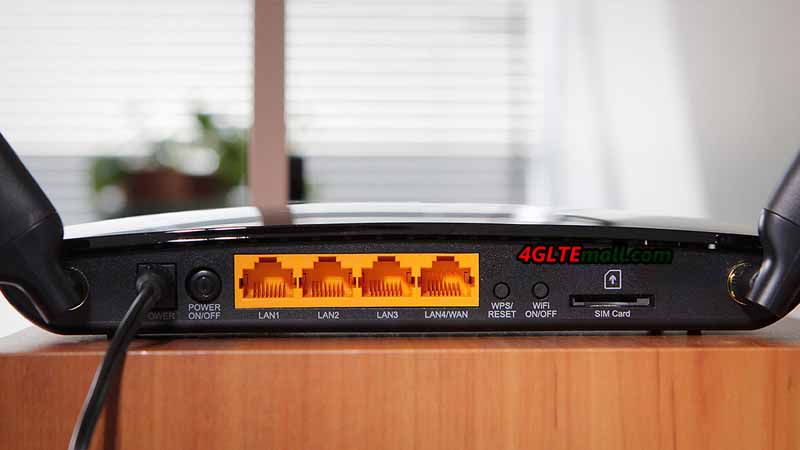


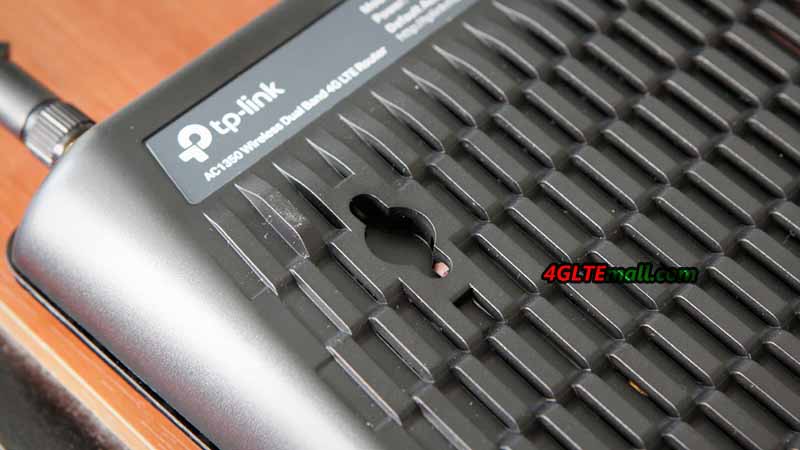
Archer MR400 is made in a stylish black case and supports the wall mount. A WPS button is also available on the back of the LTE router for quick connection of WiFi devices.

The TP-link router is equipped with one SIM card slot and supports all common cellular standards in Europe, including FDD-LTE in the frequency ranges of 800, 1800 and 2600 MHz, TDD-LTE in the 2600 MHz band and 3G at 900 and 2100 MHz. The maximum speed in 4G networks is 150 Mbit/s for reception and 50 Mbit/s for transmission (LTE Cat. 4). The MR400 Router also supports 2G-Internet and other broadband Internet standards used in different countries of the world.

To receive a mobile signal, the kit includes two small detachable LTE antennas with a small gain. In the case of a weak or uncertain input signal, more powerful directional antennas (sold separately) can be connected through the SMA connectors to the MR400.
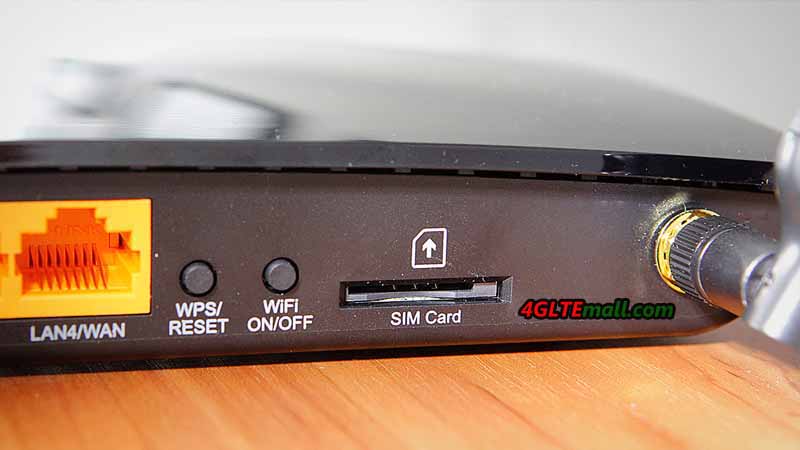


TP-Link Archer MR400 Interfaces

With the router, the adapters of changing Micro to Standard or NANO to Standard are included, which allow installing a SIM card of any format into the router. In addition to the SIM card slot, there are 4 Ethernet ports (10/100 Mbps) on the rear panel: 3 LAN ports and one switchable WAN / LAN port. Thus, the router can be connected to the Internet not only through a mobile connection but also through a normal cable from the provider. The drawbacks of the model include the absence of gigabit ports, which reduces the maximum speed of data exchange between wired and wireless devices in the network.

TP-Link Archer MR400 Settings

The configuration of the router is carried out via the web interface or the proprietary TP-Link Tether application. At the disposal of users, there are various settings of mobile connection and local network. The Archer MR400 administration panel contains all the parameters familiar to home routers, as well as some additional functions: two guest networks (2.4 and 5 GHz), parental control, QoS (bandwidth control), dynamic DNS (DynDNS, NO-IP), VPN (PPTP, L2TP, IPSec), NAT, IPv6, DHCP, protection against DoS attacks, filtering over IP and MAC addresses, etc.


The router is very easy to manage and does not require special skills for customization. In most cases, it is enough to install a working SIM card in the router and connect it to the power network: the mobile Internet and the WiFi network will work by themselves. With the Archer MR400, you can connect a large number of wireless devices to the 3G/  4G Internet and ensure the maximum speed of data exchange in the WiFi network.

General Review of Archer MR400 Specifications:
  • Frequency ranges:
    • FDD-LTE B1/B3/B7/B8/B20 (2100/1800/2600/900/800 MHz)
    • TDD-LTE B38 / B39 / B40 / B41 (2600/1900/2300/2500 MHz)
    • 3G: DC-HSPA + / HSPA + / HSPA / UMTS B1 / B8 (2100/900 MHz)
    • 2G: EDGE / GPRS / GSM (850/900/1800/1900 MHz)
  • Number of SIM cards: One
  • LTE data transfer rate up to 150 Mbps (download) and up to 50 Mbps (upload)
  • WLAN Standards: WiFi 802.11a/b/g/n/ac
  • Frequency ranges: dual-band 2.4 GHz, 5 GHz
  • Data transfer rate of WiFi: up to 867 Mbps in the frequency range 5 GHz, up to 450 Mbit/s in the frequency range of 2.4 GHz
  • Wireless signal power (EIRP): <20 dBm (2.4 GHz), <23 dBm (5 GHz)
  • Antennas:
    • 3 built-in WiFi antennas (2 x dual-band antennas 2.4 and 5 GHz, 1 x 2.4 GHz antenna)
    • 2 removable external 4G LTE antennas
  • Ports and Interfaces
    • 3 x LAN (10/100 Mbps)
    • 1 x LAN / WAN (10/100 Mbps)
    • 1 x standard SIM slot
    • 2 x SMA connector
  • WiFi Security: 64/128-bit WEP, WPA / WPA2, WPA-PSK / WPA2-PSK, WPS
  • Power: 12V, 1.5A
  • Certificates: CE, RoHS
  • Operating temperature: from 0 ° С to + 40 ° С
  • Storage temperature: from -40 ° С to + 70 ° С
  • Permissible humidity: from 10% to 90% (without condensation)
  • Size (without antennas) 202 x 141 x 33.6 mm
  • Package Content:
    • Archer MR400 router
    • 2 removable LTE antennas
    • Power plug
    • Ethernet cable
    • Warranty card
    • Quick setup guide

2018年7月14日 星期六

Sierra AirLink MG90 High Performance Multi-Network Vehicle Router

Sierra AirLink MG90 High Performance Multi-Network Vehicle Router


* Three variant models of AirLink MG90 Router


* LTE Cat6 & Cat3


* State-of-the-art LTE coverage spanning 21 LTE frequency bands worldwide


* Dual-SIM functionality to enable automatic failover between SIMs


* Dual concurrent Gigabit Wi-Fi supports up to 1.3 Gbps, up to 128 clients, WPA2 Enterprise


* Precision Geo-location with GNSS supporting 48 satellites from 4 different satellite constellations (GPS, GLONASS, Galileo, Beidou)


* Dual radio dual concurrent 3x3 MIMO 802.11ac Wi-Fi


* Support FirstNet Band 14

2018年7月12日 星期四

Alcatel EE60 4G MiFi Hotspot 5150mAh Power Bank

Alcatel EE60 4G MiFi Hotspot 5150mAh Power Bank


* Alcatel 4G Mobile WiFi + Power Bank in One


* Large battery capacity of 5100mah


* Support up to 15 WiFi-enabled devices simultaneously


* LTE DL 150Mbps, UL 50Mbps


* SIM unlocked for global use

Alcatel EE40 Specs| EE Opsray 3 EE40 | Alcatel 4G WiFi Modem EE40 Specs

Alcatel EE40 Specs| EE Opsray 3 EE40 | Alcatel 4G WiFi Modem EE40 Specs


* Alcatel 4G WiFi Modem


* LTE Cat4 DL 150Mbps and UL 50Mbps


* Supports up to 10 devices via Wi-Fi and 1 via USB cable


* Hassle free installation, just Plug-N-Play


* Friendly user interface


* SIM unlocked for use with any 4G/3G network worldwide

2018年7月3日 星期二

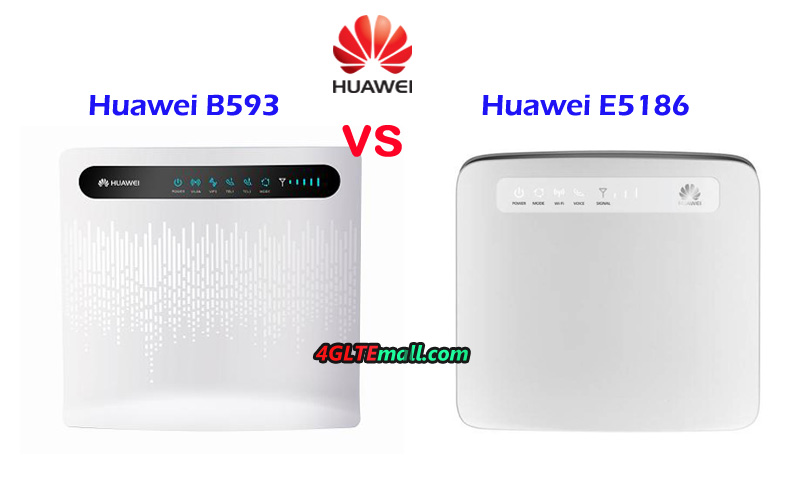
Huawei E5186 VS LTE CPE B593

As a top network solution provider, Huawei LTE Gateways are an important series of wireless products for home or office networking. Huawei B593 is the world’s first 4G LTE WiFi routers with Ethernet port and the new competitors are continuously presented to the public by Huawei in following years. Huawei E5186 wireless router is one of them. If you want to change the 3G router or ADSL connection to Huawei 4G Gateway, you may ask: what’s the difference between the Huawei B593 and Huawei E5186? Which one is better in performance? In this article, we will review the appearance, interfaces, specs and variant models to provide possible answers for you.


Huawei E5186 VS B593 Router Appearance and Interface

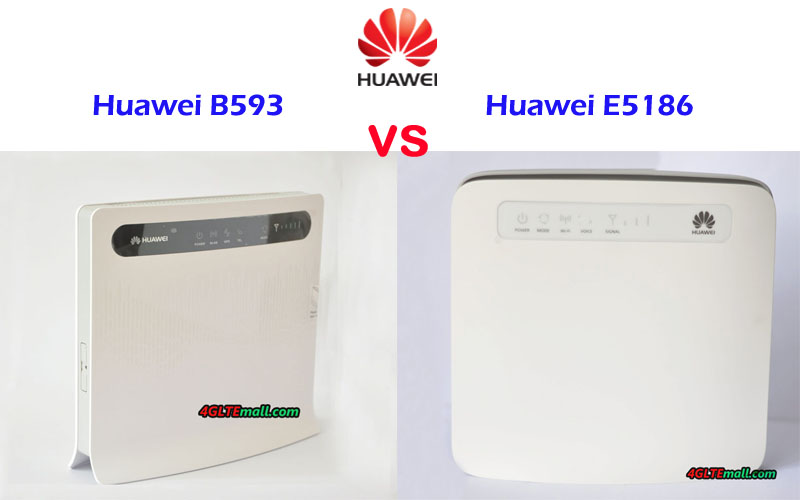
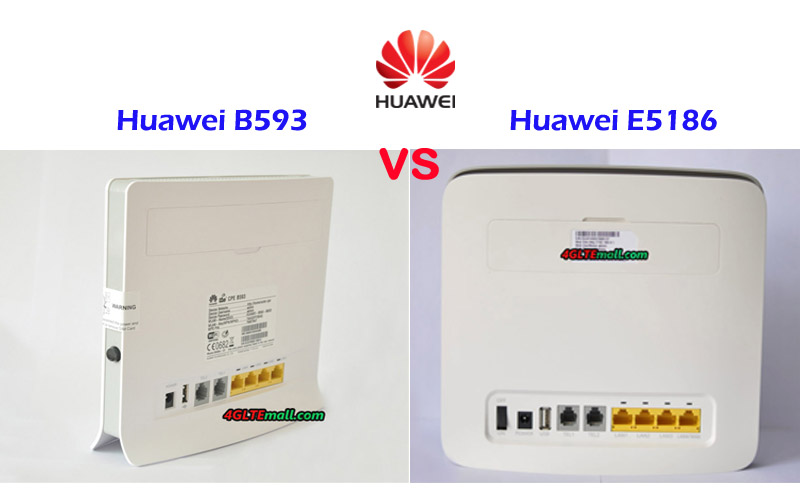
The Huawei 4G Router B593 and E5186 are both the 4G WiFi router with Ethernet ports in traditional router shape. On the front of Huawei B593 LTE CPE, there are some indicators for Power, WLAN, WPS, Telephone, Mode, and Signal. On the Huawei E5186, it indicates Power, Mode, WiFi, Voice, and Signal. Of course, Huawei logo is with the indicators. On the back, they both have two connectors for an external antenna. The connector type is SMA. They can use the same 4G LTE External Antenna.


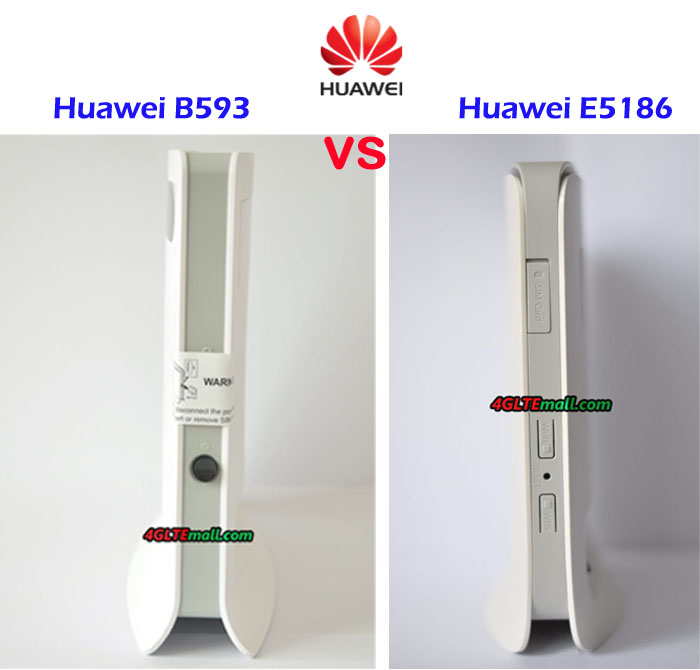
On the back, there is also a line of interfaces, including 4G LAN port(one for WAN/LAN), two telephone port, one USB 2.0 port and power plug port. On the Huawei E5186, there is a power button to switch on or off the power. Huawei B593 power button is at the side of the SIM card slot. The Huawei E5186 SIM card slot is also at the body side with the WPS and WIFI button. Huawei E5186 uses Micro SIM card while the first generation LTE router B593 uses standard SIM card.


Huawei B593 VS E5186 Specs and variant models

From the specs, we can’t see much difference between the two Huawei routers. Actually, as the upgraded version of Huawei B593, Huawei E5186 almost followed the design of Huawei B593 and has just little adjustment. To meet the different LTE frequency bands worldwide, Huawei had assigned many variant models for LTE CPE B593, such as B593u-12, B593s-22, B593s-82, B593u-91, B593s-850, B593s-601, B593s-516, B595s-931 etc… Huawei E5186 also has two variant models: E5186s-22a and E5186s-61a. You can check details specs of the variant models on the product page. And below the table shows the details specs of Huawei E5186 and Huawei B593 Router for reference:

Model Huawei E5186 Huawei B593
Product type LTE WiFi Router LTE WiFi Router
Category LTE Cat.6 LTE Cat.3
Chipset HiSilicon LTE Cat6 Chipset Qualcomm MDM9200
Data rates DL 300Mbps/UL 50Mbps DL 100Mbps/UL 50Mbps
Supported 4G LTE frequency bands E5186s-22a: Band 1/3/7/8/20/38 E5186s-61a: Band  3/7/28/40 * B593u-12:  Band 1/3/7/8/20 * B593s-22:  Band 1/3/7/8/20 * B593s-82: Band 38/40 * B593s-601: Band 3/7/40 * B593s-516: LTE FDD Band 2/4/5/7/8
WLAN 802.11a/b/g/n/ac, dual-band 2.4GHz & 5GHz 802.11b/g/n, dual-band 2.4GHz
Max supported users 64 users 32 users
MIMO 2 x 2 MIMO n/a
Connector for external antenna Two, SMA-female jacks Two, SMA-female jacks
Buy Antenna Huawei E5186 external antenna Huawei B593 External Antenna
App management Huawei Hilink APP Huawei Hilink APP
SIM Size Micro SIM Stand SIM
Battery NO NO
Dimensions 190 mm × 200 mm × 32 mm 190 mm x 35 mm x 176 mm
Interfaces * 3 x LAN port(45) * 1 x LAN/WAN port (45) * 2 x telephone port(RJ11) * Two external LTE antenna ports (SMA-J1.5) * One micro-SIM card slot * 1 x USB 2.0 port * 3 x LAN port(45) * 1 x LAN/WAN port (45) * 2 x telephone port(RJ11) * Two external LTE antenna ports (SMA-J1.5) * One stand SIM card slot * 1 x USB 2.0 port
Datasheet Huawei E5186 Datasheet(PDF) LTE CPE B593 Datasheet
User Manual Huawei E5186 User Manual(PDF) LTE CPE B593 Manual
Other features  Firewall, CS Voice, VoIP, TR069 Remote Management, HTTP Online Upgrade, QoS, USB Share, UPnP, IPV6, DLNA, Fax, Print, VPN DHCP, Firewall, URL filter, LAN MAC filter, IP Filter, DMZ, Port forwarding
Reviews Huawei E5186 Review Huawei B593 Router Review
449.00USD 259.00USD 189.00USD


Huawei E5186 VS B593 Speed Test

If you want to know the real speed performance of the two router, check the Huawei E5186s-22 vs Huawei B593u-12 speed test: [embed]https://youtu.be/qUHrShcHQvI[/embed]  

Summary

From the specs table, we can see the Huawei E5186 is more advanced which could support up to 300Mbps download speed thanks to LTE Cat.6 with 2 x 2 MIMO and carrier aggregation technology. The speed is almost three times faster than the speeds of Huawei B593 router. The interfaces features are very similar in the two Huawei LTE Router with Ethernet ports. Huawei E5186 WiFi router could support maximum of up to 64 users, which is the double quantity of that on Huawei B593 router. So if you want to buy a fast 4G router, the Huawei E5186 would be the right one.   The advantage of Huawei B593 router is that it has many variant models for more LTE frequency bands, if you are looking for a router for specific bands, you may find one in LTE B593 variant models. And the Huawei B593 price is much cheaper than the price when it’s first available in the market. And it’s also much cheaper than Huawei E5186 price. If you don’t have enough budgets for Huawei LTE CPE E5186, then Huawei B593 would provide 4G speed for your internet access.

2018年6月30日 星期六

Netgear Nighthawk M1 VS Huawei E5885Ls-93a

In past years, 4G mobile routers with SIM card slot are becoming more and more well-known because they are of small size and can be easily taken in a handbag or in a pocket. Nowadays, more and more people would prefer the 4G router with Ethernet port, which would provide one more option for internet connection. What's the most, the manufacturers typically set up the 4G routers with Ethernet with large battery pack, which makes the device more expensive. Huawei is the first manufacturer to release its 4G mobile router with Ethernet port, and now the Netgear follows. Huawei E5885 is the latest 4G mobile hotspot with Ethernet and Netgear presents the Nighthawk M1 as its first 4G router with Ethernet. Someone may ask: what's the difference between Huawei E5885 and Nighthawk M1? Which one is better? You may find the answers after reading this article.


Huawei E5885 Nighthawk VS M1 Appearance and Interface
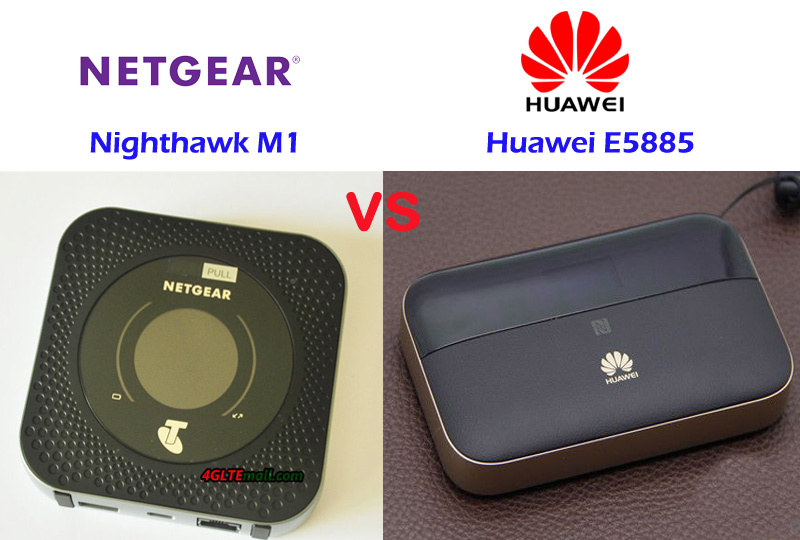
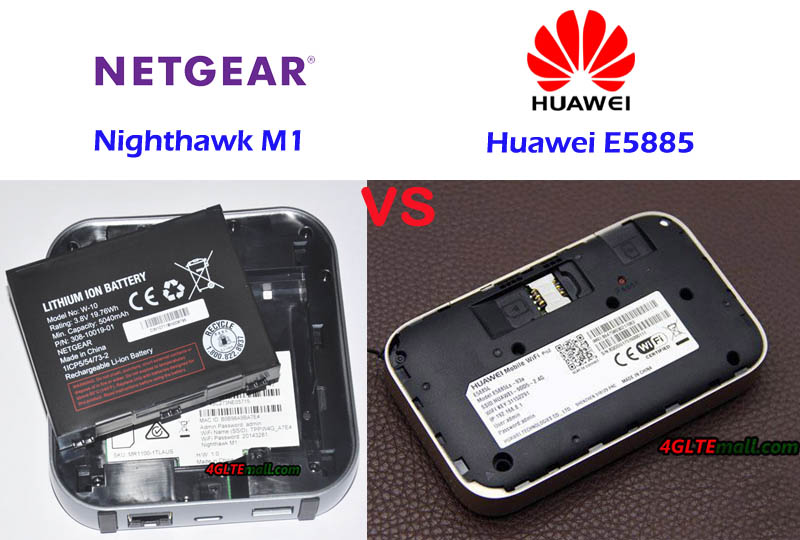
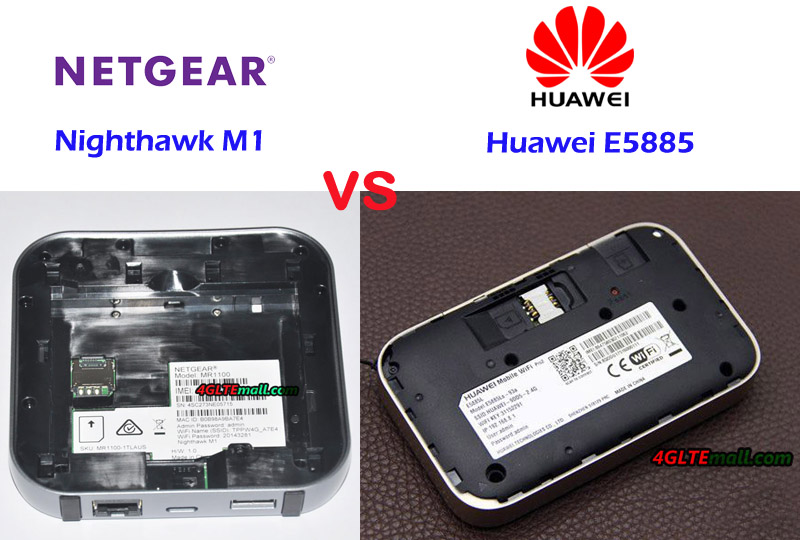
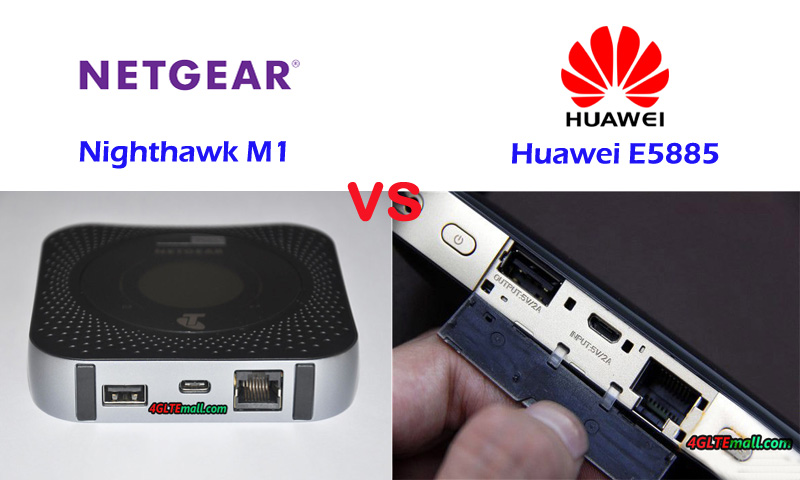
Actually, before the Huawei E5885 was presented, Huawei had released a few mobile hotspots with Ethernet port such as E5151, E5730, E5351, E5770, E5771, which are a series of mobile routers with Ethernet. It has been proved this series of MiFi hotspots are very popular in the end-users. Now the upgraded Huawei E5885 is available with more advanced features and cool design. On the front of E5885, the upper part is LED screen while the lower part is leather material with Huawei logo. The touch feels much better than the predecessor models. And it's much thicker than the mobile hotspot E5770 and E5771. The power button, WPS, and the Interfaces are located on the top edge of the body. The Ethernet port and USB ports are covered by a square cap, which you have to open to see. The back cover could be removed, however, like the Huawei E5786, the battery is built-in and non-changeable. The Mirco SIM card slot and SD slot are available with the reset button.


Unlike its predecessor of Netgear mobile router, Nighthawk M1 also has a thick body. On the front, there is a round screen, like E5885, it's also not a touchscreen. There are battery and data transmission indicators around the screen. The Netgear logo and carrier logo are on the side of the screen. The power button is on the top and the Ethernet & USB ports are located on the opposite side. The difference is Netgear Nighthawk M1 has two connectors for external antenna, which is missing in Huawei E5885. And the USB ports for Nighthawk M1 and the Huawei E5885 are different. The Nighthawk M1 back cover could be removed and unlike Huawei E5885, the battery could also be removed for exchange. The Netgear M1 also uses Micro SIM card size, but no slot for SD card.


Netgear Nighthawk VS Huawei E5885 Specs and Variant Models

Since the nighthawk M1, AT&T Nighthawk M1, and another variant model for Europe market. The Huawei E5885 Huawei E5885Ls-93a. It seems to be a global version, however, in China, the Huawei E5885LS-93a in China has only one language (Chinese) available. In other countries such as Saudi Arabia or Romania, we found many languages available, at least with the English language. From the appearance, we can see the Nighthawk M1 and Huawei E5885 are very different in design. To know more difference, let's have a look at the detail specs of the Nighthawk M1 and E5885:  

Model Netgear Nighthawk M1 Huawei E5885
Product type LTE Mobile Hotspot LTE Mobile Hotspot
Category LTE Cat.16 LTE Cat.6
chipset Qualcomm MDM9x50 Hisilicon LTE Cat6 chipset
Data rates DL 1Gbps / UL 100Mbps DL 300Mbps / UL 50Mbps
Supported 4G LTE frequency bands - Telstra Nighthawk M1: Band 1/3/7/8/28
- AT&T Nighthawk M1: Band 1/2/3/4/5/7/12/29/30/66
- HK Nighthawk M1: Band 1/3/8/20/29/30/38/40/41
Huawei E5885Ls-93a: Band 1/2/3/4/5/7/8/19/20/28 * TDD-LTE: Band 38/40/41/42
WLAN 802.11a / b / g / n / ac, dual-band 2.4GHz & 5GHz 802.11a / b / g / n / ac, dual-band 2.4GHz & 5GHz
Max support users 20 users 32 users
MIMO 4 X 4 MIMO 2 X 2 MIMO
Connector for external antenna Two, TS-9 jacks No connector
Buy Antenna Netgear Nighthawk M1 Antenna N / A
App management Netgear Aircard APP Huawei Hilink APP 3.0
SIM type Micro SIM Micro SIM
Battery Removable, 5040 mAh Non-removable, 6400mAh
Dimensions 105.5 x 105.5 x 20.35 mm  112.00 x 69.20 x 23.00mm
Ethernet Port One Ethernet Port for LAN One port for WAN / LAN port (RJ-45)
Datasheet download AT&T Nighthawk M1 Datasheet Huawei E5885 Datasheet
User Manual AT&T Nighthawk M1 Manual Huawei E5885 Manual
Other features 4 CA band, JumpBoost Power bank, CA, NFC
Reviews Netgear Nighthawk AT&T M1 Review Huawei E5885Ls-93a Review
Price 459.00USD 249.00USD

Summary

From the specs, we can see the Nighthawk M1 Router is more advanced with the support of LTE Cat.16, which could achieve speeds up to 1Gigabit / s and upload speed to 100Mbps. The speed is much faster than that of Huawei E5885. The LTE Advanced Pro technologies would provide amazing surfing experience. The Nighthawk M1 variant models could be used globally after unlocking. However, there may be a limitation due to network incompatibility. The Huawei E5885LS-93a seems to be more open for global travel. It covers the main frequency bands in all areas.


The Nighthawk M1 could support up to 20 users while Huawei E5885 mobile hotspot supports up to 32 users. The Ethernet port in Huawei E5885 is for WAN and LAN but the port in Netgear M1 is only for LAN, which may not be expected for Ethernet. The Huawei E5885 has a large battery capacity of 6400mAh while Netgear MR100 has around 5040 mAh battery; However, the removable battery of Nighthawk M1 seems better than Huawei E5885 built-in battery. The lack of an antenna connector in Huawei E5885 is also criticized while the Netgear M1 has two connectors for external 4G antennas, which is very useful when using the device in weak signal areas. Per the feedback from the users of Nighthawk M1, it's the best 4G router with Ethernet. However, the advanced Nighthawk M1 is more expensive, so if you would buy Nighthawk M1, the price is an important concern.

2018年6月28日 星期四

Huawei B612 B612s-51D B612S-25D 4G LTE WiFi Router Specs

Huawei B612 B612s-51D B612S-25D 4G LTE WiFi Router Specs


* LTE Category 6 wireless CPE


* LTE DL 300Mbps/UL 50Mbps


* 4 x 4 MIMO


* Built-in DHCP Server, DNS RELAY and NAT


* 4 x LAN ports(One for LAN/WAN), 1 x Landline phone port


* Two connectors for external antenna(SMA type)


* Support up to 32 wireless devices


* SIM type: Micro SIM